CasinoWare is a software package. There is a separate application for each task.
Server
The server application is the heart and the brain. The server is started first and opens all the required databases. In addition, all services (e.g. online live clock, SMS dispatch) are started.
All other applications connect via the network and receive their data from the server and send commands to the server. This ensures that all applications are always up to date. Such a client/server solution has the advantage that many work stations can be used at the same time.

Tournament Floor
The Tournament Floor application is responsible for creating, configuring and running tournaments. The floor staff enters all the necessary data for a tournament here, such as name, buy-in, type, levels, payouts and much more. The tournament is then set to the appropriate status via the control field, i.e. you start registration, start seating, start the clock, pause the clock or end the tournament. See More...

Cash Game Floor
The Cash Game Floor application is responsible for creating, configuring and running cash games. In contrast to the tournament, this is more about managing the limits and the associated tables, as well as the various waiting lists. CasinoWare offers the best possible overview of all tables and lists. See More...
Display Manager
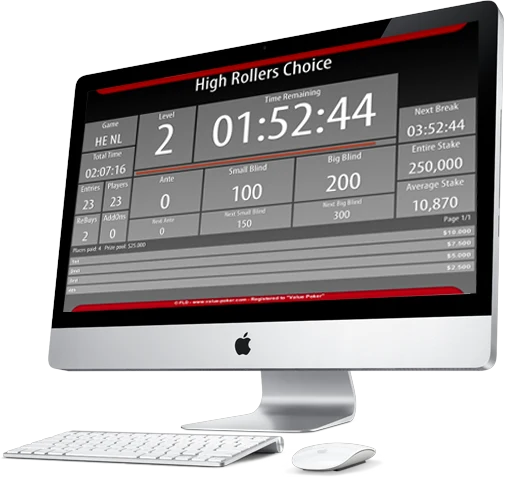
The Display Manager application is responsible for displaying information to the players. Like all other programs, the Display Manager can be started on any computer. It shows the physical (e.g. HDMI) and virtual (e.g. Apple TV, iPad, ChromeCast) output interfaces in a list. The desired views (e.g. lobby, clock, ranking lists) can then be assigned to the interface from a second list with simple drag and drop.
It's super cool that every display manager can be controlled remotely by every other one.

Entrance Check-In
CasinoWare also serves the security idea. For this there is the check-in application, which is not intended for registering players in a tournament or cash game, but for collecting the player data at the entrance. Many casinos have entry controls where players have to identify themselves and all of their data is entered into the system. This separates the registration of new players from the actual game operation.
In addition, there is the option of issuing a player or member card linked to the player. In particular, unknown players can be processed very quickly when buying tournament tickets or put on a waiting list. This enables a quick and easy process.

Report Manager
The Report Manager is an analysis application that creates charts and lists. You can see when the most players are in the casino, or how many players are more likely to be playing tournaments or cash games at certain times. Of course, player information can be aggregated, e.g. who has the most cash game playtime this month. See More...

Table Manager
The Table Manager is used at each individual table. The touchscreen device allows the dealer to seat players, remove players from the table, and move players around. Additionally, the dealer can enter pot sizes or rake amounts, and even record trick money and jackpot money. See More...

Player Kiosk
The player kiosk is a device for the player himself. Using a touchscreen and RFID reader, players can access their profile. In the dashboard, players can join cash game waiting lists or print vouchers for drinks, food, taxis, or the casino. See More...
You don't need a separate computer for each application
Each application can be started on any computer, which also means that small businesses can use all programs on one computer, e.g. server, tournament floor and display manager to run tournaments.